
এখন থেকে আনলিমিটেড Temporary গুগল Email তৈরি করুন সহজে || google mail ganared

আশা করি সকলেই ভালো আছেন। আল্লাহর অশেষ রহমতে আমিও আলহামদুলিল্লাহ্ ভালো আছি I hope everyone is doing well. By the grace of Allah, I am also doing well, Alhamdulillah
আনলিমিটেড Temporary গুগল Email তৈরি করুন Create Unlimited Temporary Google Emails
সহজে একটি টেলিগ্রাম বট এর মাধ্যমে টেম্প মেইল তৈরি Create temporary emails easily through a Telegram bot
➡️ এখন থেকে আনলিমিটেড Temporary গুগল Email তৈরি করুন সহজে ➡️ Now create unlimited temporary Google emails easily
টেলিগ্রাম বট এর মাধ্যমে টেম্প মেইল তৈরি Create temporary emails through a Telegram bot
গুরুত্বপূর্ণ তথ্য Important Information
টেম্পোরারি ইমেইল Temporary Email
১ ঘন্টার জন্য সক্রিয় থাকে Active for 1 hour only
আনলিমিটেড Unlimited
সীমাহীন ইমেইল তৈরি Create unlimited emails
গুগল ড্রাইভ Google Drive
আনলিমিটেড স্টোরেজ Unlimited storage
নিরাপদ Secure
ব্যক্তিগত তথ্য সুরক্ষিত Personal information protected
বর্তমান সব ধরনের ওয়েবসাইট এ গেলেই শুধু লগইন আর লগইন করতে হয়। তবে আমরা চাই যে, আমরা আমাদের নিজের মেইল ব্যবহার না করতে এর জন্য Tempmail ব্যবহার করে থাকি এবং অনেক অ্যাকাউন্ট তৈরির জন্যও Tempmail ব্যবহার করে থাকি তবে এগুলো শুধু অ্যাকাউন্ট তৈরির জন্যই ব্যবহার হয়।
আর অনেক ওয়েবসাইট থাকে যেগুলোতে গুগল mail ছাড়া লগইন ই হয় না কিন্তু আপনার অনেক অ্যাকাউন্ট তৈরি করা লাগবে তাহলে কি করবেন? তাই আজকে নিয়ে এসেছি গুগল এর ই Temporary ইমেল যেটি একদম আনলিমিডেট।
এই ইমেইল গুলো অন্য সব Google email এর মতোই কাজ করবে। মানে আমরা মোবাইল এ যেমন করে আমাদের email লগইন করি সেটিও করতে পারবেন। আর সবকিছু গুগল এর Access পাবেন এই ইমেই গুলোতে।
সবথেকে মজার কথা হলো এই ইমেল গুলোতে আপনাকে Google Drive এর আনলিমিডেট Storage দিবে। তবে এই মেইলগুলো একটি ১ ঘন্টার জন্য করে হবে। আমি জানিনা আপনি এগুলো কোন কাজে ব্যবহার করতে তবে খারাপ কাজে ব্যবহার করবেন না।
Currently, when you go to any website, you only need to log in and log in. However, we want to use Tempmail instead of our own mail, and we also use Tempmail for creating many accounts, but these are only used for account creation.
And there are many websites where you can't log in without a Google mail, but if you need to create many accounts, what will you do? So today I've brought Google's temporary email which is completely unlimited.
These emails will work just like any other Google email. Meaning, you can log in to your email on mobile as we normally do. And you'll get access to everything Google in these emails.
The most interesting thing is that these emails will give you unlimited Google Drive storage. However, these emails will only last for 1 hour. I don't know what you'll use these for, but don't use them for bad purposes.
স্টেপ বাই স্টেপ গাইড Step by Step Guide
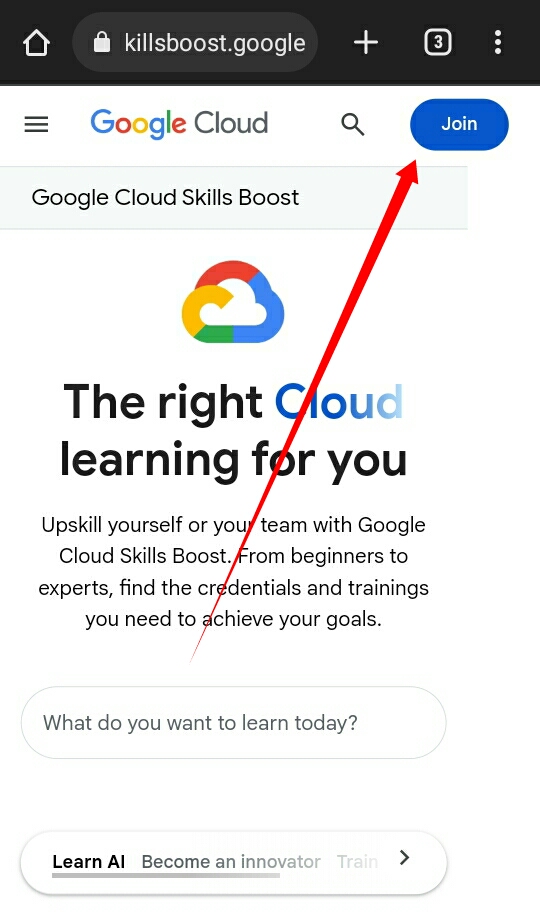
Google Skills Boost ওয়েবসাইটে যান Visit Google Skills Boost Website
প্রথমে এই লিংকে ক্লিক করুন অথবা গুগল এ Google Skills boost এটি লিখে সার্চ দিলে পেয়ে যাবেন। প্রথমে Join হতে হবে।
First, click on this link or search for "Google Skills boost" on Google to find it. First, you need to join.
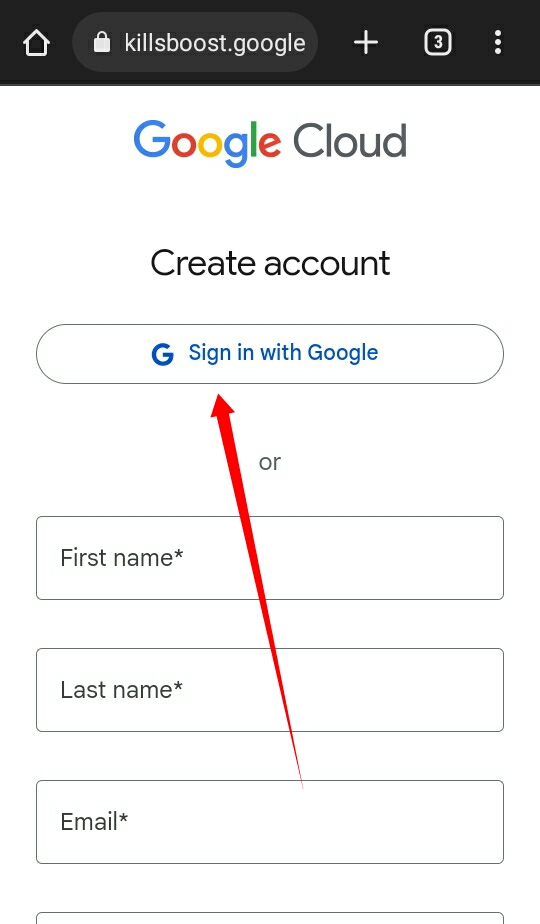
গুগল দিয়ে লগইন করুন Login with Google
এখন গুগল দিয়ে লগইন করুন।
Now log in with Google.
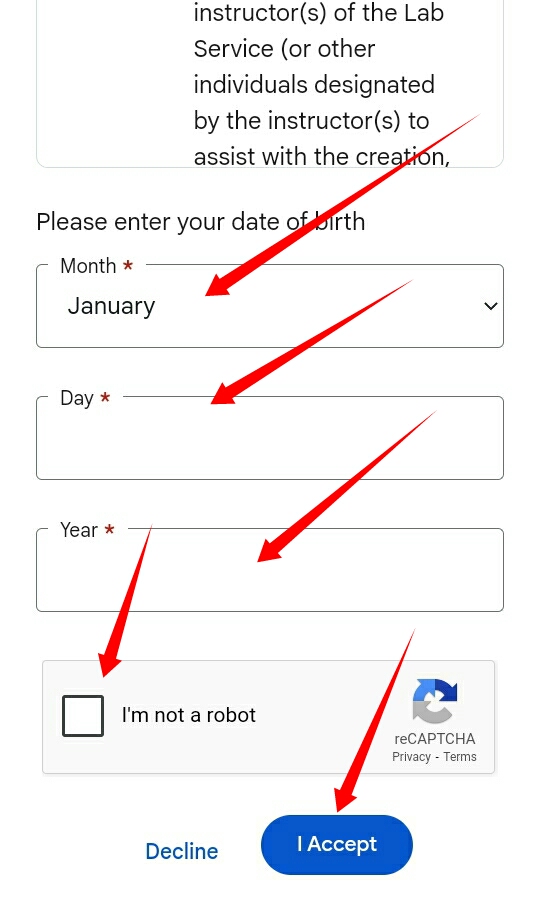
তথ্য পূরণ করুন Fill Information
লগইন হলে এখানে আপনার Date of birth লিখে captcha পূরন করুন, captcha আপনার নাও দেখাতে পারে।
After logging in, enter your date of birth and complete the captcha here. The captcha may not appear for you.
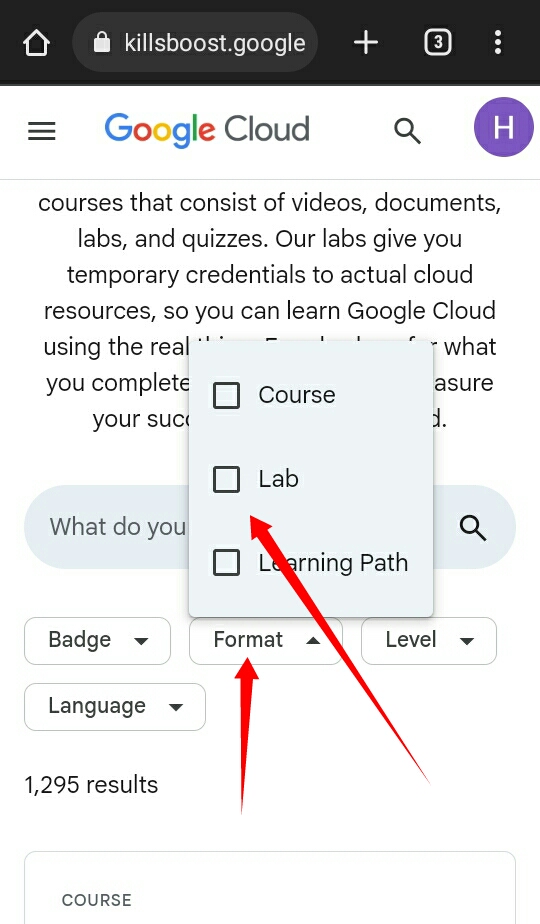
ল্যাব সিলেক্ট করুন Select Lab
এখন Format এ ক্লিক করে Lab সিলেক্ট করুন।
Now click on Format and select Lab.
স্টার্ট ল্যাব Start Lab
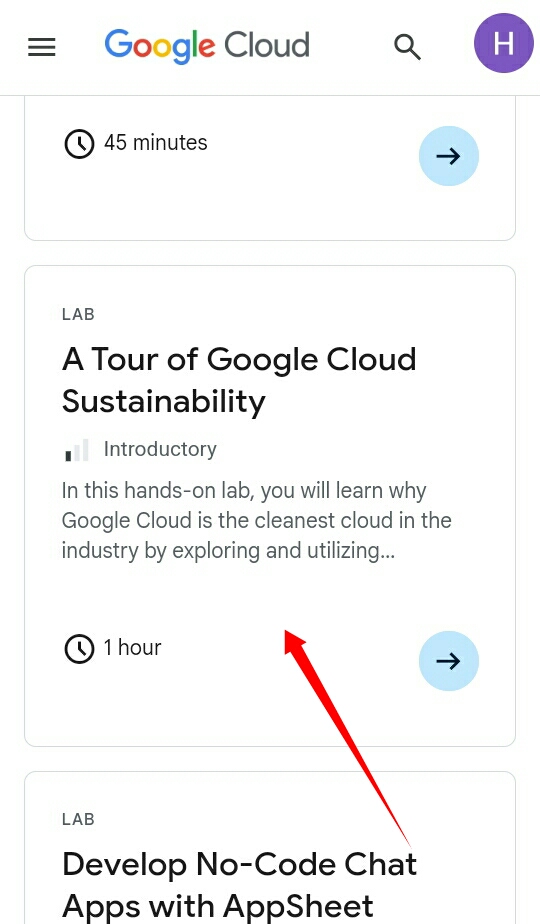
এখন এখানে একটু নিচে আসলে এটি দেখতে পাবেন, ক্লিক করুন। এখানে আসলে মোবাইল এ থাকলে Desktop মোড করে নিবেন।
Now if you scroll down a bit here, you'll see this, click on it. If you're on mobile, switch to desktop mode.
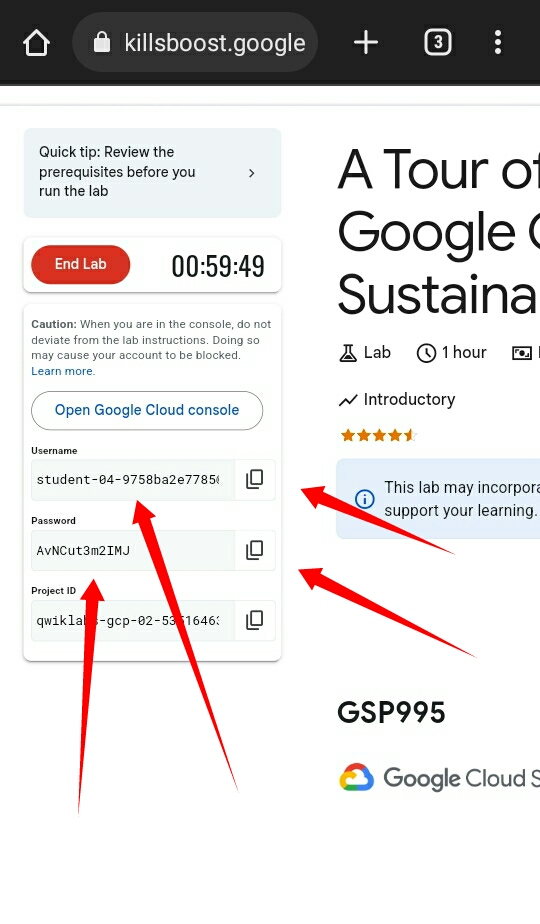
ইমেইল তৈরি হয়েছে Email Created
দেখুন আপনার ইমেইল তৈরি হয়ে গেছে, এগুলো কপি করে অন্য সব গুগল মেইল এর মতো লগইন করতে পারবেন। তবে এই ইমেইল শুধু ১ ঘন্টার জন্য।
See, your email has been created. You can copy these and log in like any other Google mail. However, this email is only for 1 hour.
ইমেইল ব্যবহার Using the Email
নতুন ইমেইল তৈরি Create New Email
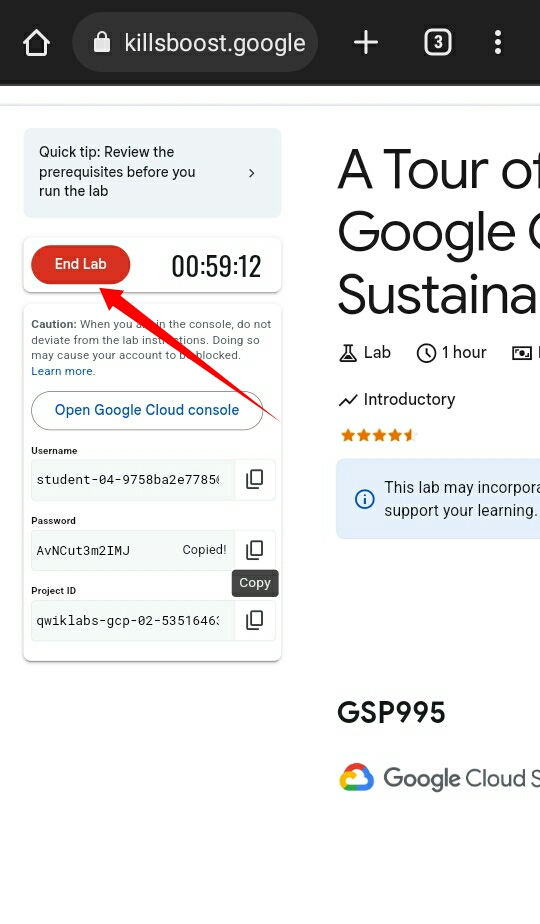
এই যে End Lab এখানে ক্লিক করলে, এই ইমেইল টি চলে যাবে এবং আবার Start Lab আসবে সেম ভাবে আপনাকে নতুন আরেকটি ইমেইল দিবে।
If you click on End Lab here, this email will go away and Start Lab will appear again, giving you a new email in the same way.
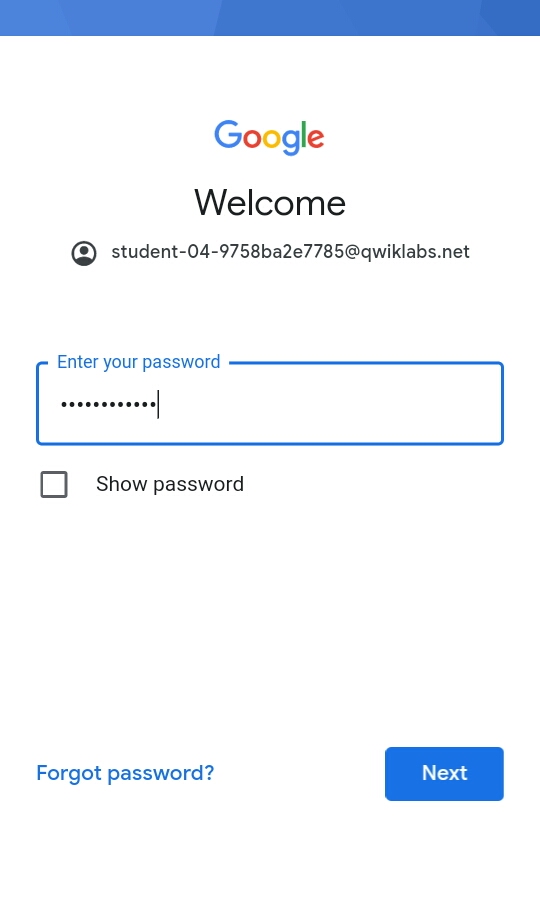
ইমেইল লগইন Email Login
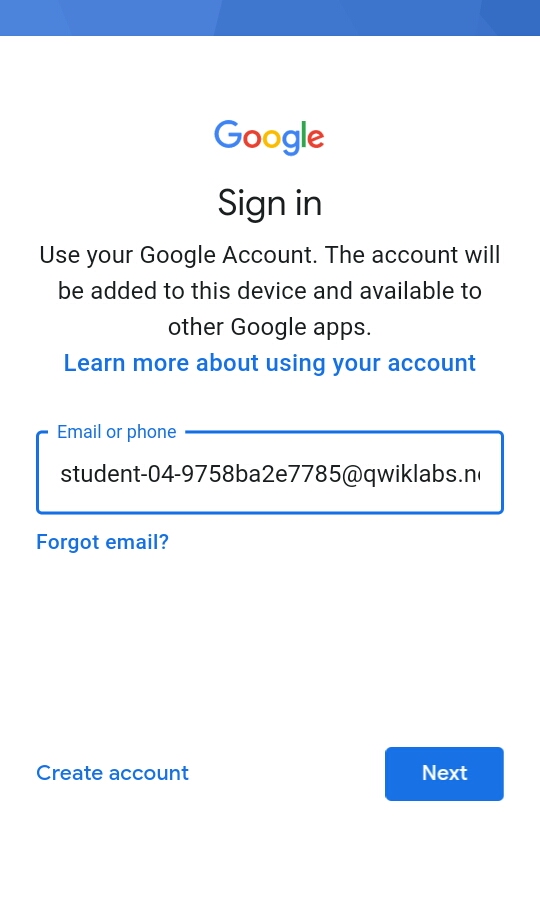
এগুলো অন্য সব ইমেইল এর মতোই কাজ করবে দেখুন।
See, these will work just like any other email.
💡 গুরুত্বপূর্ণ টিপস: এই ইমেইল গুলো শুধুমাত্র ১ ঘন্টার জন্য সক্রিয় থাকে। আপনি চাইলে বারবার নতুন ইমেইল তৈরি করতে পারবেন। খারাপ কাজে ব্যবহার করবেন না। 💡 Important Tips: These emails are only active for 1 hour. You can create new emails repeatedly if you wish. Do not use them for bad purposes.
টেম্পোরারি গুগল ইমেইল তৈরি সম্পূর্ণ Temporary Google Email Creation Complete
ধন্যবাদ সময় নিয়ে আমাদের পোস্ট পড়ার জন্য। প্রয়োজনে এই গাইডটি আবার দেখুন। Thank you for taking the time to read our post. Refer to this guide when needed.


